Team Share by Spun
Share your WhatsApp
with your team.
You choose what they see.
Use Spun as a shared inbox for your existing WhatsApp number. Multiple users can work together through their own Spun accounts, while you choose which conversations each person can access.
Unlimited teammates. $0 per seat.
7-day free trial
Team Share included. No credit card required.
WhatsApp for teams
One WhatsApp number, a shared team inbox
WhatsApp for teams means one WhatsApp number that several people work at the same time, each signed in as themselves. Spun turns the number you already use into a shared inbox: connect it with one QR scan, with no WhatsApp Business API and no new number.
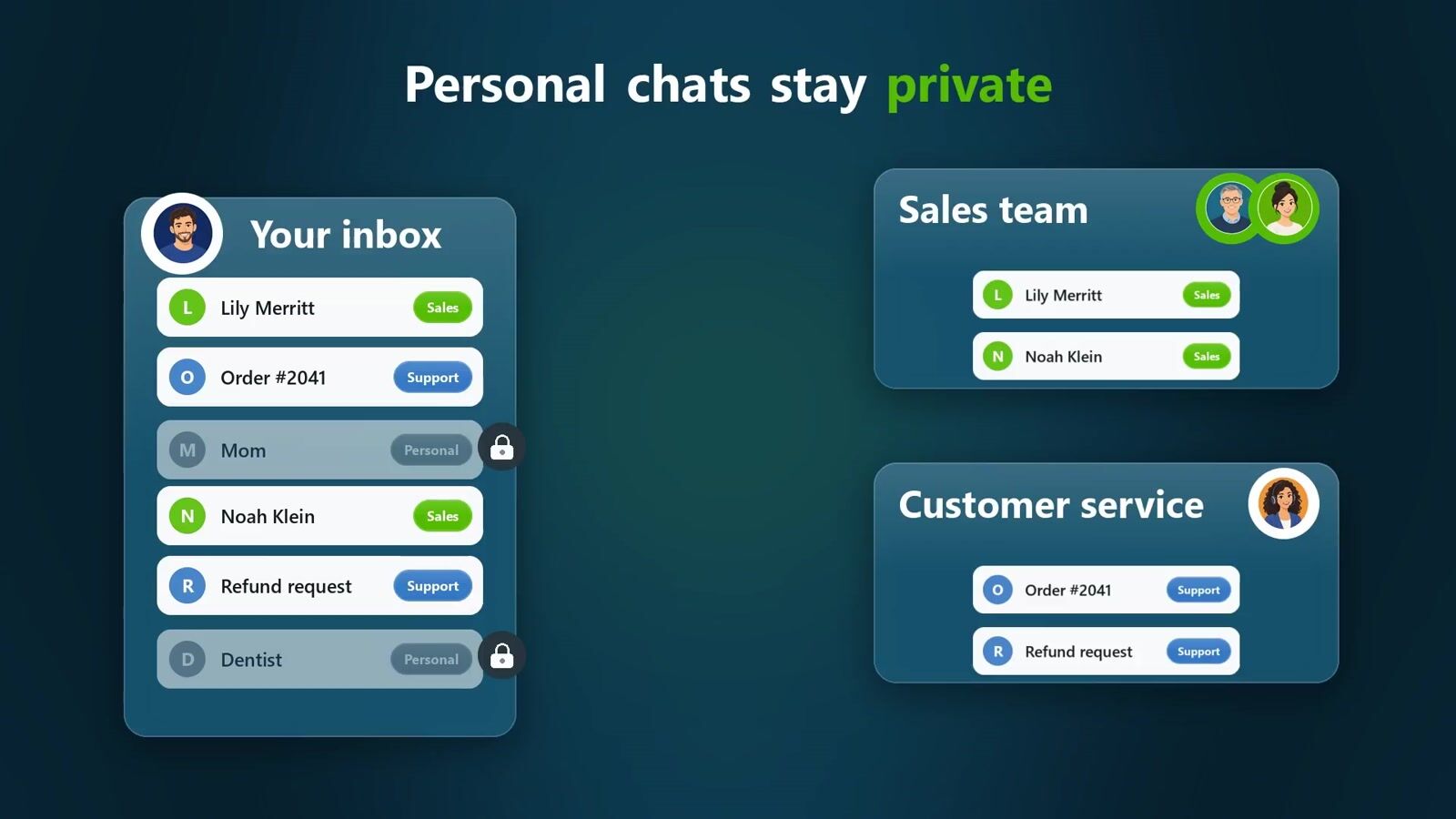
In the team inbox you choose what each teammate can see and do, down to a single chat, and your personal chats stay private. Everyone sees who is viewing or typing in a conversation, so two people never answer the same customer. Teammates are unlimited on every paid plan, with no per-seat fee.
You shouldn’t have to answer every chat.
WhatsApp makes communication easy. But as your business grows, conversations pile up, important messages get buried and follow-ups slip through. Give your team a hand in handling it all, while choosing exactly what they can see.

Sales piling up?
Share leads with your salesperson.
Too many questions?
Let your assistant handle customer questions.
Personal chats mixed in?
You choose what your team sees.
A shared inbox for your team.
Keep personal chats private.
Share sales and support conversations with your team. Keep personal chats outside their shared access.
More time to grow your business.

You
You choose their access
Incoming Messages

Sales Team
Shared sales conversations

Customer Service
Shared support conversations
Share selected work conversations. Keep personal chats outside their access.
Access you control
You choose their access.
Decide what each person can do, and which conversations they can see.
Choose a role. Start with Viewer, Team Member, Manager or Full Control.
Make it fit. Adjust permissions and share selected filters or pipeline stages.
Communication
- Send messagesOn
- Schedule messagesOn
- Archive chatsOn
Organization
- Edit labelsOff
- Edit contactsOff
- Set alarmsOff
- View pipelineOn
- Move pipeline cardsOff
- Edit pipelineOff
Advanced
- Use AIOn
- Payment remindersOff
Contacts they can see
- None
- Chat only (selected)
- Only contacts in their filters
- All contacts of the inbox
No credit card required.
See who’s on it before you jump in.
Know who’s viewing, who’s replying and who sent each message.
See who’s viewing.
Live indicators show when a teammate is looking at a chat.

Wesley Patel
Jennifer is viewingWesley Patel
Jake Arnold is viewingKnow when someone’s replying.
Get a heads-up when a colleague is already replying to the same chat.
Know who sent it.
Every reply shows its sender inside Spun. Customers see your business replying from its WhatsApp number.
Sent by Jake Arnold
Perfect. I can set up a few viewings that week. Which days work for you?
06:18 PM
Sunday, October 11, 2026
Sent by Jennifer
Hi, when can I give you a call?
02:30 AM
No credit card required.
Less forwarding.
More getting things done.
Keep team context and next steps beside the conversation.
Keep the context with the chat.
Add private team notes. Mention a colleague when you need their attention.
Team Notes (2)
Add a team note... use @ to notify someone
Had a good call.Sent the offer.
Jake Arnold · Oct 14, 06:13 PM
I promised him 10% off on the next order
Jennifer · Oct 14, 06:12 PM
Turn messages into next steps.
Create a task from a customer’s message.
- Add Note
- Create Task
- Add Alarm
Share the work.
Enjoy the breathing room.
Let your team help with customer conversations, while you stay in control of what each person can see and do.

Meet the rest of Spun.
The WhatsApp you know, with the business tools you need.
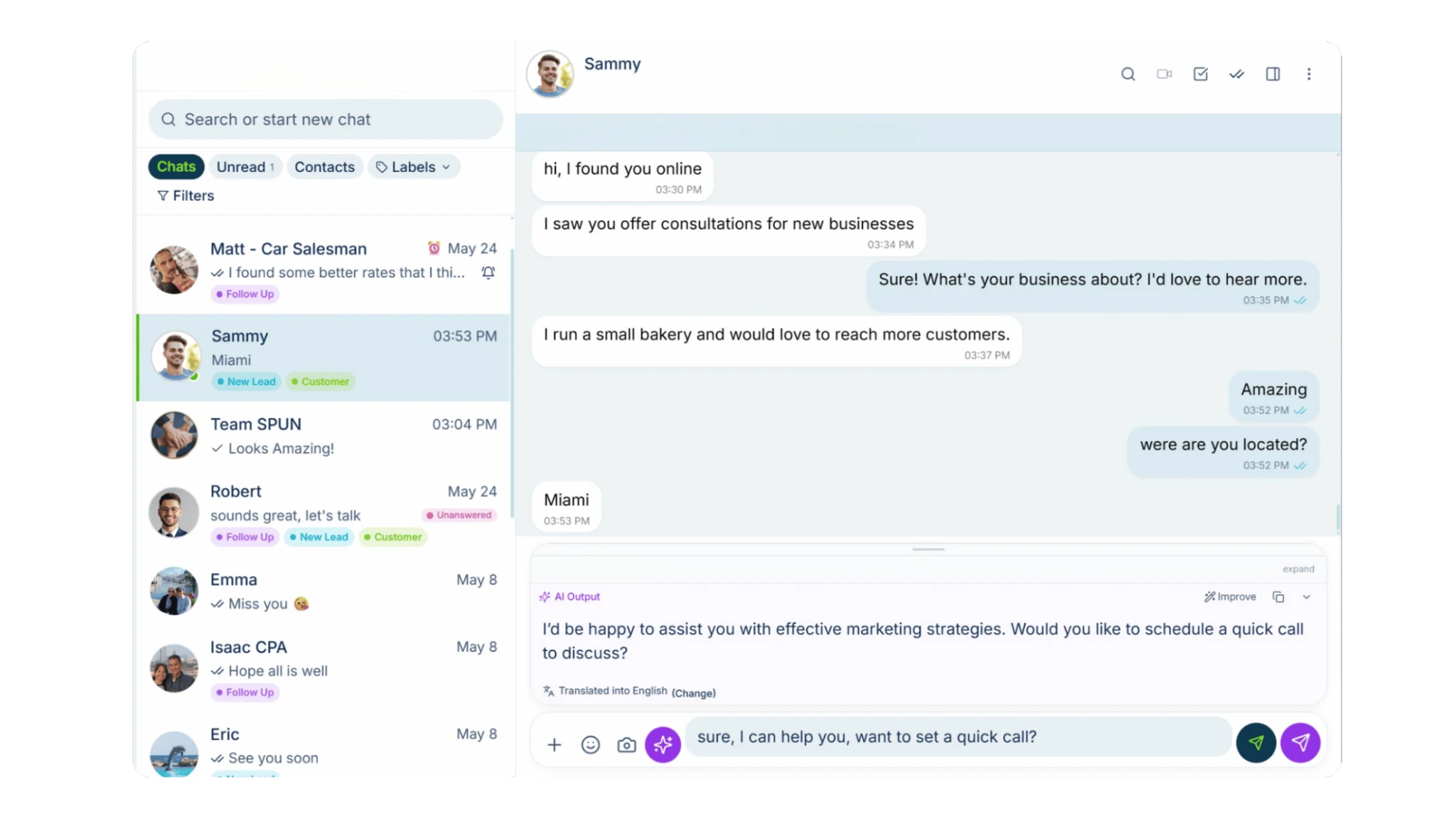

Your smart AI agent
Ask questions about your WhatsApp, analyze conversations and get help using Spun.

AI that helps you reply
Turn a short instruction into a polished reply, informed by your company’s knowledge base. Catch up on any chat with an AI summary.

Automation & bots
Easily build automations, set up bots to answer your messages and organize conversations with AI Auto-Labeling.

Productivity tools
Manage tasks, track sales in your pipeline, add notes and alarms, sync with Google Calendar, respond faster with quick replies and schedule messages.

Keep in Touch
Know who’s gone quiet. See the customers and leads you haven’t spoken to recently, and follow up from one window without opening every chat.

Communicate in their language
Translate incoming and outgoing messages, both voice notes and text. You read, hear and speak your language. They read, hear and speak theirs.

Spun MCP
Connect your AI assistants to Spun through MCP. Then ask them to find information, analyze conversations and take action in your WhatsApp.
No credit card required.
Grow your team
Keep the seat cost at $0
Unlimited teammates. $0 per seat.
Included in your 7-day trial and every paid plan.
Bring your assistant, salesperson or whole team into the conversations you choose. Try Team Share together, free for 7 days.
No credit card required.










Your number. Their own login.
Connect your WhatsApp number, then give your team the access they need.
- 1

Invite your team
Give each teammate access through their own Spun account.
- 2

Choose their access
Set what they can do and which conversations they can see.
- 3

Start working together
Reply from your business number, with your team alongside you.
See how to set up Team Share
Watch how to invite teammates, choose their permissions and control which conversations they can see.
Questions
7 DAYS FREE
Share the work.
Stay in control.
Try it with your team.
Give your team the conversations they need, while keeping personal chats outside their shared access. Try Team Share free for 7 days and see how it fits your business.
Team Share included in your free trial.
Start your 7-day free trial
Team Share included. No credit card required.
Try it with your team. See the difference for yourself.
Already have an account? Sign in
Share the work.
Let your assistant, salesperson or teammates help with customer conversations.
Choose what they see.
Set each person’s permissions and share only the conversations they need.
Discover more with Spun.
Explore AI replies, productivity tools and customer follow-ups in the same workspace.
WhatsApp is a trademark of its owner. Spun is an independent product and is not affiliated with or endorsed by WhatsApp or Meta.